What the HubSpot API Actually Gives You
The sales side of the business had a weekly report that somebody assembled by hand. It was a table of activity counts by week, broken out by person and by type, and it took a chunk of somebody’s Monday to produce. The ask was to make it a dashboard, and while we were in there, to answer some questions the hand-built version could not: which deals have gone quiet, whether anybody is following up after meetings, how long it takes to get the next meeting with an account.
This turned out to be the messiest of the three integrations, and almost none of the difficulty was where I expected it. The API is fine. The awkwardness is in the modelling, and in one definition that quietly produced numbers that looked right and were not.
This article is about what you get from the API, what the scopes really are as opposed to what I assumed they were, and the reconciliation that saved the whole thing from being subtly wrong.
The objects, and there are more than you think
A CRM has more moving parts than a cost API. What we needed came from five places.
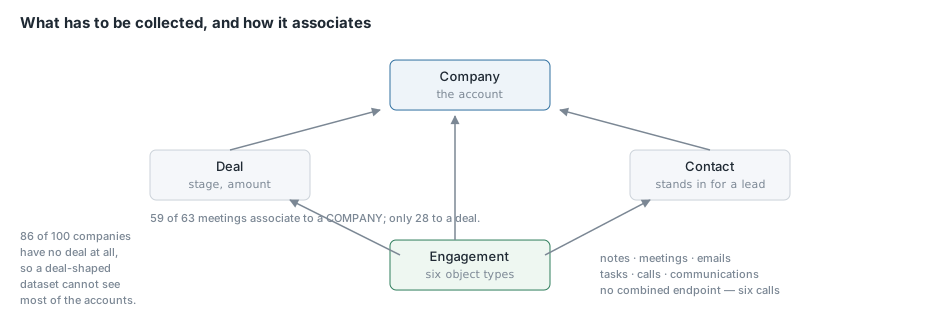
Deals are the pipeline. Each one has a stage, an amount, an owner and an association to a company.
Companies are the accounts. This one I nearly skipped, and skipping it would have been the biggest mistake in the project. More on that below.
Contacts stand in for leads. HubSpot has a newer dedicated Leads object, but the lifecycle stage on a contact already carries the state we needed.
Owners map an owner id to a human being. Two lines of code, and without it every panel shows GUIDs.
Engagements are the activity, and this is the part that surprised me. They are not one object. They are six: notes, meetings, emails, tasks, calls and communications, each with its own endpoint. There is no combined “activity” endpoint. If you want a count of what somebody did, you make six requests and union the results.
Calls and communications had barely a handful of records between them when I first looked, and I nearly left them out on that basis. I put them in because leaving them out means the per-person totals are quietly wrong the first time somebody starts dialling, and nobody will think to check.
Pipeline stages are not a list you hardcode
Deals carry a stage id, not a stage name. The names, their order, whether a stage counts as closed, and its win probability all live in the pipelines endpoint:
curl -s "${HS}/crm/v3/pipelines/deals" -H "$AUTH"
I resolve that into a lookup at collection time and denormalise the labels onto each deal row. The alternative is storing raw stage ids and mapping them in the dashboard, and a KQL panel has nowhere to join a mapping from. A hardcoded id-to-name table inside dashboard JSON goes stale the first time somebody renames a stage.
Carrying the CRM’s own displayOrder matters as much as the name. A funnel sorted alphabetically reads “Closed Won, Contracting, Discovery” which is nonsense. With the order stored as a column, the dashboard sorts on it and never needs to know what the stages are.
One thing to watch: HubSpot preserves whatever whitespace somebody typed into a stage name. We had a stage stored as "Contracting Redlines " with a trailing space, which groups separately from "Contracting Redlines" and would have appeared as two bars on the funnel. Trim the labels on the way in.
The problem I nearly shipped: what is a week?
The hand-built report counted a week as Monday to Sunday. So did I. That part was never in question.
What I had not thought about was which timestamp to count on. Engagements have two:
-
hs_timestamp— when the thing happened, or claims to have happened -
hs_createdate— when it was logged in the CRM
These are not the same and the difference is not small. A meeting held on Thursday and logged on the following Monday has a hs_timestamp in one week and a hs_createdate in another.
I built the first version on hs_timestamp, because it seemed obviously right. Then, because I had six weeks of the hand-built report to compare against, I checked. Not one of the six weeks matched. Not close.
Rebuilding on hs_createdate matched four of six. Closer, which meant the timestamp choice was right and something else was still off. The something else was the timezone: bucketing in UTC moves an engagement logged on a Sunday evening into the following week. Cutting the weeks Monday-to-Sunday in US Eastern matched all six exactly.
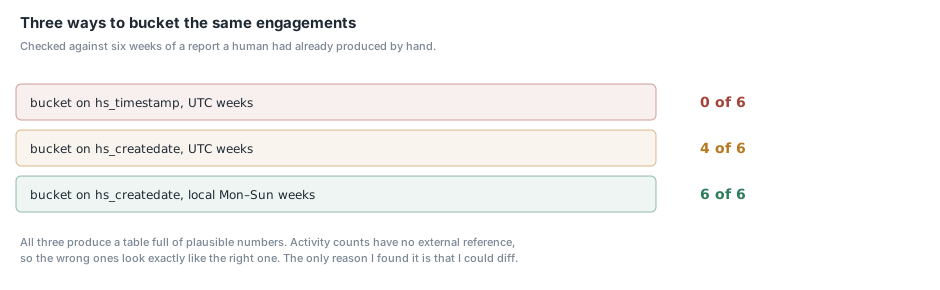
by hs_timestamp, UTC weeks           0 of 6 weeks match
by hs_createdate, UTC weeks          4 of 6 weeks match
by hs_createdate, local weeks        6 of 6 weeks match
I want to dwell on this because it is the single most valuable thing that happened in this project. Both wrong versions produced a table full of plausible numbers. Nobody looking at a dashboard would have said “that’s wrong”. The hs_timestamp version was wrong by a lot and still looked fine, because activity counts have no external reference that anybody carries in their head.
The only reason I found it is that a human had already produced six weeks of the same report by hand, and I could diff against it. If you are replacing a manual report with an automated one, do the reconciliation before you ship, not after, and treat any mismatch as a bug in your understanding rather than in the old spreadsheet.
The reasoning also settles which measure the dashboard is reporting. Counting on hs_createdate makes it a measure of what the team did that week, rather than of when a meeting happened to be scheduled. Both columns are stored, because the other question is legitimate and one of them cannot be reconstructed later.
In KQL, the week cut is two corrections stacked, because startofweek() is Sunday-based and UTC-based:
| extend LocalCreated = datetime_utc_to_local(CreatedDate, "America/New_York")
| extend WeekStart = startofweek(LocalCreated - 1d) + 1d
Shift back a day, take the Sunday, shift forward a day.
Companies matter more than deals
The instinct with CRM reporting is to build everything around deals, because deals are what the business cares about. I did that first and it was wrong in a way the data made obvious.
Two numbers changed my mind.
Most companies have no deal. In our portal the large majority of companies had no associated deal at all. A dashboard built only on deals cannot see them, and “an account nobody has opened a deal on, that nobody owns, that nobody has contacted in a month” is exactly the thing you want a pipeline hygiene dashboard to surface.
Most meetings do not associate to a deal. Nearly every meeting had a company association; fewer than half had a deal association. So attributing activity through the deal alone silently discards more than half the meetings.
That second one is the more dangerous of the two, because it produces a per-account activity chart that is not empty, just wrong. Every engagement now carries a company id, a contact id and a deal id where each exists, and the account rollups go through the company.
Associations are a separate call
Engagements do not carry their parent objects inline. You ask for associations separately, and the batch endpoint takes up to a hundred ids at a time:
POST /crm/v4/associations/{fromObject}/{toObject}/batch/read
{ "inputs": [ {"id": "123"}, {"id": "124"} ] }
Two things about this endpoint.
It returns HTTP 207 Multi-Status, not 200, whenever some of the inputs have no association of that type. That is the normal case, not an error. I wrote a checker that treated anything other than 200 as a failure and spent a while convinced the token was broken.
And an engagement can associate to more than one deal. I take the first and move on. Fanning one engagement into several rows would double count it in every per-person total, and the company association is the one that matters for account rollups anyway.
The scopes, and how I got them wrong
I want to be blunt about this because I made the same class of mistake three times in a fortnight.
I wrote a scope list by reasoning from the endpoints being called: notes, meetings, emails and tasks each get their own read scope. It looked obviously right. None of those four scopes were on the token that demonstrably worked.
The token that read every one of those objects successfully carried this:
crm.objects.owners.read
crm.objects.deals.read
crm.schemas.deals.read
crm.objects.companies.read
crm.schemas.companies.read
crm.objects.contacts.read
sales-email-read
No crm.objects.notes.read. No meetings, tasks or calls scope. HubSpot grants engagement access through the older contacts coupling, and the granular scopes either do not exist or are not what gates those endpoints.
I only found this by introspecting a token that already worked:
curl -s -X POST https://api.hubapi.com/oauth/v2/private-apps/get/access-token-info \
  -H "Content-Type: application/json" \
  --data "{\"tokenKey\":\"$TOKEN\"}"
That returns the granted scopes. Comparing them against my list showed I had invented two scope names outright and omitted two that were load-bearing. Somebody following my original documentation would have minted a token that authenticated, read deals, and failed on every engagement.
The lesson generalises past HubSpot. Do not document scopes by reasoning about endpoints. Introspect a token that works, and if you cannot, attempt each call and record what fails.
Two more notes on permissions.
Grant no write scopes. Nothing in this collector writes to the CRM, and a token that can modify records is a token a scheduled job can damage records with.
And mint a token for the job rather than reusing a personal one. Ours is a separate private app with read-only access, so revoking it has no effect on anybody’s day.
Numbers that are not numbers
One small trap, because it cost a production run.
HubSpot returns an empty string rather than null for an unset numeric field. jq’s // operator only substitutes null and false, so (.amount // "0") on an unset amount yields "", and "" | tonumber fails with a parse error that names the input file. It reads like a corrupt download rather than one blank field on one record.
def num: if . == null or . == "" then 0 else tonumber end;
Every numeric field goes through that.
Conclusion
The API is not the hard part of a CRM integration. The hard part is that a CRM models a messy human process, so the objects are more numerous than you expect, the associations are optional in both directions, and several of the fields that look authoritative are empty in practice.
If you take two things from this article, take these. Model around accounts rather than deals, because the accounts with no deal are the ones your dashboard most needs to show you. And if you are automating a report a human already produces, reconcile against their version before you ship, because activity counts have no external reference and a wrong one looks exactly like a right one. Mine matched zero of six weeks on the first attempt, and the only reason I know that is that I checked. The next article is the collector itself.